Show the workspaces
Let customers view the working floor, rooms and equipment. A virtual tour also shows the surroundings of a workspace or component.
 Request a price estimatePrice estimate
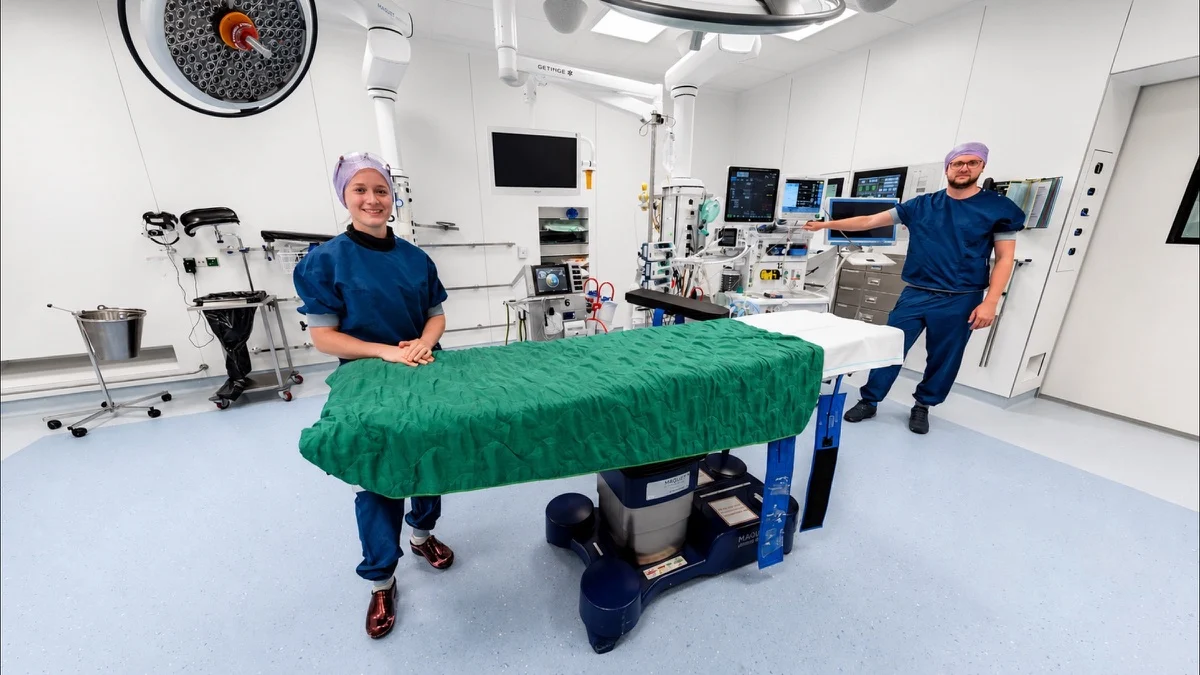
Take your time and look around.
Drag the image or use the arrow keys.Loading panorama…
Would you like to have a virtual tour of your business created? With an interactive 360° virtual tour let your customers, applicants and international partners explore your location online, completely in your corporate style.
A look behind the scenes
Let customers, applicants and business partners look inside before they visit. They can view the rooms, workspaces and features captured in the tour.
Let customers view the working floor, rooms and equipment. A virtual tour also shows the surroundings of a workspace or component.
Visitors choose which room to open and where to look. They can revisit a place and open the information added there.
Show applicants where they would work: the workspace, offices and other parts of the business. New colleagues can return to the tour during their induction.
Choose where you look
A virtual tour allows visitors to walk through your location online as if they were there themselves. They can look around in 360 degrees, choose their own route and open photos, videos or extra information along the way.
Click and drag to look around. Double-click to view full screen.
A clearer picture before a visit
A virtual tour lets people view your location remotely. Before an appointment, visitors can look around, return to a room or open the explanation provided there. They can do this on a computer, tablet or smartphone.
A 360-degree view shows what is beside, behind and opposite a camera position. Visitors choose where to look and then select another viewpoint.
When discussing a room, workspace or installation, you can open the same space. The place you are talking about is there to see.
Visitors open the tour through a link. You can embed it on your website or use it during a conversation or presentation.
Add text, photographs or video to an information point. The explanation appears alongside the room or component it describes.
Connect the places that belong to a route or process. Visitors can follow the sequence and view additional explanations at each relevant point.
From factory to campus
This approach works especially well if you want to show something that is difficult to explain with individual photos or text. Think of a care facility, factory, campus, hotel or logistics centre.
Show patients and visitors in advance what the location looks like, where they need to go and what they can expect.
Explore this applicationShow customers and partners how your factory, machinery and production process work in practice.
Explore this applicationGive customers and partners a clear online view of your fleet, terminals, warehouses and logistics processes.
Explore this applicationLet prospective students and parents view the campus, classrooms and facilities before visiting an open day.
Explore this applicationLet guests view rooms, facilities and the surrounding area in advance, so they know what to expect.
Explore this applicationLet customers walk through your shop or showroom online and discover products at their own pace.
Explore this applicationGive clients a clear picture of construction projects, workshops and progress on site.
Let prospective members view the sports or wellness venue, facilities and atmosphere online in advance.
Explore this applicationFrom plan to virtual tour
From the initial idea to publication: we keep the process clear and consult with you on every step.
We discuss the objective, the target audience and the location. Afterwards, we determine the route and which photography, video, audio or floor plans are needed. We also establish how the tour aligns with your corporate identity.
On the agreed day, we photograph the location. After that, we build the tour, add the chosen information and media, and test everything on computer, tablet and smartphone.
You receive a first draft and communicate what you want to adjust. After the final check, we deliver the tour. You can place it on your website, share it via a link or use it during presentations. We can also arrange the hosting and support.
From healthcare organisations and schools to international companies. Below is a selection of organisations for which we have created virtual tours and drone footage.













Hosting and your own client portal
Need to change some text, replace a photo or show a different video? Update the information in your tour through your own portal. You can also view usage statistics for your tours there.
€120per year
Excluding VAT
We host your tours. Share a link or add the tour to your own website.
Update text, photos, videos and links when your information changes.
View usage statistics for your tours in the same portal.
Practical questions
Do you want to know what a virtual tour costs, how long it takes to make or how to put it on your website? Here you will find the answers.
Request a price estimateVirtual tours start at €1,500. Business projects usually cost between €2,500 and €5,000. The scope, content, preparation and travel determine the proposal. Photographing one building is a different brief from recording several sites with video, floor plans and explanations in multiple languages. The annual hosting package is separate from the production price. New photography and extra work are discussed beforehand. Describe your location and what you want to show when you request a price estimate.
Following the intake, you will receive a schedule for the recording, development and feedback. The lead time depends on the size of the location and the additional components you choose.
Yes. You can put the tour on your website or share it via a direct link. We will help you with the placement.
Our package with fast hosting, information editing in the client portal and usage statistics costs €120 per year, excluding VAT. Creating the tour, new 360-degree photography and extra work are discussed separately.
You can add video, audio, text, photos, maps, links and interactive information, among other things. We tailor the components to your target audience and your story.
Explore all the possibilities of a virtual tourYes. The client portal lets you edit text, ordinary photos, videos, links and other added information yourself. You cannot add extra 360-degree photographs. The portal is included in our hosting package with usage statistics.
Yes. We help with embedding the tour and with changes that require new photography or technical work. You can update the information in your tour yourself in the client portal. If you need help with a change, we discuss what is required.
How to update a virtual tour